

Salesforce Winter ’27 ships API version 68.0. The release notes were published on 19 August 2026, sandbox preview began in late August 2026, and production instances upgrade across weekends in early September and October 2026 depending on your instance. (Coverage dates these weekends inconsistently because Salesforce Trust maintenance windows run from Friday evening into Saturday. Look up your own instance on Salesforce Trust rather than trusting any blog’s calendar, this one included.)
Reading the Winter ’27 release notes end to end is not the same as knowing what to do. The notes tell you a limit moved from 6 MB to 25 MB. They do not tell you which of your batch jobs were shrunk to a scope size of 50 three years ago to work around that limit, or whether it is safe to put them back. They tell you FORMULA() exists in SOQL. They do not tell you that it is Beta, sandbox-only, and supports exactly two arithmetic operators.
This article covers the nine Winter ’27 developer features with real consequences for how you build and maintain Salesforce applications, with the availability status, the constraints, and the parts that will bite you.
| # | Feature | Status in Winter '27 | Requires |
|---|---|---|---|
| 1 | Higher Apex heap limits (6→10 MB sync, 12→25 MB async) | GA, automatic | Nothing. Applies on org upgrade |
| 2 | FORMULA() in SOQL WHERE | Beta | API 68.0+, sandbox / Dev Edition / scratch org only |
| 3 | Complex template expressions in LWC | Status changed in Winter '27, verify in your org | Component apiVersion 66.0 or later |
| 4 | Salesforce development plugin for Claude Code | Available (tooling, not a platform feature) | Claude Code, Node.js LTS, Salesforce CLI, Python 3.8+ |
| 5 | /services/data/latest/ REST endpoint | GA | REST API |
| 6 | Elastic limits extended to Batch Apex | Beta | Org setting in Apex Settings |
| 7 | Real HTTP callouts in Apex integration tests | Developer Preview | Scratch orgs only, ApexIntegrationTests feature |
| 8 | Apex Symbol API | Beta | API 68.0+, Author Apex and View Setup permissions |
| 9 | Recompile only invalid Apex classes and triggers | GA | API 68.0+, Author Apex permission |
Winter ’27 raises the Apex heap limit from 6 MB to 10 MB for synchronous transactions and from 12 MB to 25 MB for asynchronous transactions. The change is generally available, applies automatically when your org upgrades, and requires no configuration or opt-in.
The asymmetry matters more than the numbers. No other per-transaction governor limit moved with it. SOQL queries are still 100 synchronous and 200 asynchronous. DML statements are still 150. CPU time is still 10 seconds synchronous and 60 seconds asynchronous. Total query rows is still 50,000. Only the memory ceiling changed.
Most mature orgs contain a handful of what you might call limit settlements: a batch scope reduced from 200 to 50, a Map split into two passes, a callout response truncated before deserialization. Each was a fix made under time pressure, and each permanently costs throughput.
Winter ’27 makes some of those settlements reversible. Not all of them. The diagnostic question is whether the original workaround was protecting heap and only heap. If it was also protecting CPU time, query rows, or DML count, the constraint has not moved and reverting will simply relocate the failure.
Before you touch anything, measure. Both of these are existing Limits methods, not new in Winter ’27:
// Run in anonymous Apex in production AND in each sandbox you deploy from.
System.debug('Heap ceiling: ' + Limits.getLimitHeapSize());
System.debug('Heap used: '    + Limits.getHeapSize());
If the two orgs report different ceilings, you have a deployment hazard (see below).
The second thing worth changing is how guard clauses are written.
Before, a threshold hardcoded against a ceiling that no longer exists:
public void execute(Database.BatchableContext bc, List<Order__c> scope) {
    for (Order__c o : scope) {
        if (Limits.getHeapSize() > 9000000) { // 75% of the old 12 MB async cap
            System.enqueueJob(new OrderSyncQueueable(remaining(scope, o)));
            return;
        }
        accumulate(o);
    }
}
After, derived at runtime so it follows the org:
public void execute(Database.BatchableContext bc, List<Order__c> scope) {
    Long threshold = (Long)(Limits.getLimitHeapSize() * 0.75);
    for (Order__c o : scope) {
        if (Limits.getHeapSize() > threshold) {
            System.enqueueJob(new OrderSyncQueueable(remaining(scope, o)));
            return;
        }
        accumulate(o);
    }
}
Grep your codebase for literal 6000000 and 12000000 values. Those are now wrong in every upgraded org, and they will stay wrong the next time the limit moves.
A Winter ’27 sandbox enforces 10 MB and 25 MB. A production org that has not yet reached its upgrade weekend still enforces 6 MB and 12 MB. Code written and tested against the higher ceiling compiles, passes tests, and deploys cleanly, then throws System.LimitException: Apex heap size too large in production on the first real payload.
Salesforce shipped a control for exactly this. In Setup → Apex Settings, non-production orgs (sandboxes, scratch orgs, Developer Edition) have a checkbox labelled Enforce the Summer ’26 Apex heap limit. Enabling it keeps that org on the old 6 MB and 12 MB ceilings so anything built there is safe to deploy into an org that has not upgraded. Salesforce’s Apex product team has described the setting as a transitional mechanism, and it becomes unnecessary once every org in your deployment chain has upgraded.
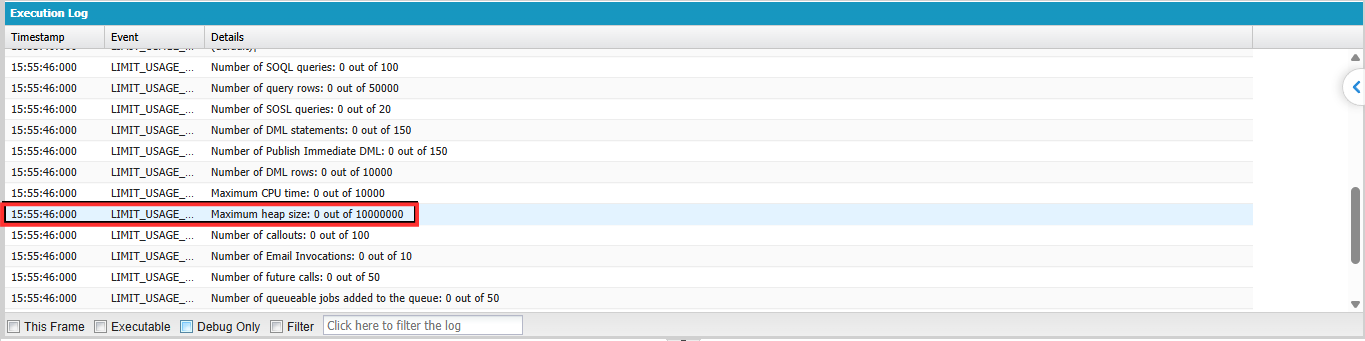
Limits.getLimitHeapSize() in every org in your pipeline and record the values.Do not treat 25 MB as license to hold entire datasets in memory. Heap is per transaction, not per job. A batch job that processes 500,000 records across 2,500 chunks still needs each chunk to be bounded. Using the new ceiling as a substitute for bulkification produces code that works today and fails the next time record sizes grow.
FORMULA()WHERE clause, so you can filter on a computed value without creating a formula field or post-filtering in Apex. In Winter ’27 it is a Beta feature, available only in sandboxes, Developer Edition orgs, and scratch orgs on API version 68.0 or later. It is not available in production.
The syntax:
WHERE FORMULA('<expression>') <operator> <literal>
Filtering on a derived value has always meant choosing between three bad options: add a formula field you only need for one query, duplicate the rule in Apex and query a wider candidate set, or maintain both. For ISVs the problem is worse, because you cannot add fields to a subscriber’s schema.
Before, the rule lives in Apex after a wider query:
List<Order__c> allOrders = [
    SELECT Id, Name, Revenue__c, Cost__c
    FROM Order__c
    WHERE Status__c = 'Shipped'
];

List<Order__c> highProfit = new List<Order__c>();
for (Order__c o : allOrders) {
    if (o.Revenue__c != null && o.Cost__c != null
        && (o.Revenue__c - o.Cost__c) > 250) {
        highProfit.add(o);
    }
}
After, the rule lives in the query:
SELECT Id, Name, Revenue__c, Cost__c
FROM Order__c
WHERE Status__c = 'Shipped'
AND FORMULA('Revenue__c - Cost__c') > 250
Date arithmetic works the same way. To find orders that shipped more than three days after the order date:
SELECT Id, Name, OrderDate__c, ShipDate__c
FROM Order__c
WHERE FORMULA('ShipDate__c - OrderDate__c') > 3
And it composes with ordinary field filters:
SELECT Id, Name, Revenue__c
FROM Order__c
WHERE Revenue__c > 600
AND FORMULA('ShipDate__c - OrderDate__c') <= 2
WHERE clause only, not HAVING.+ and -) only. No multiplication, division, or function calls. A margin percentage filter is not expressible.DOUBLE, INTEGER, DATETIME, DATE, and CURRENCY. In practice INTEGER behaves like DOUBLE and DATE behaves like DATETIME.Use a formula field when the same derived value is needed in reports, list views, validation rules, or Flow, or when the calculation involves multiplication, division, or conditional logic. Use Apex filtering when the rule genuinely needs branching or lookups that arithmetic cannot express. Reach for FORMULA() when the rule is query-only, simple additive or subtractive arithmetic, and you would otherwise be adding schema you do not want.
The realistic Winter ’27 posture: prototype with it in a scratch org, keep the equivalent Apex or formula field in the production path, and revisit when Salesforce announces GA.
Complex template expressions let a Lightning Web Component evaluate a broad subset of JavaScript directly inside template curly braces, instead of requiring a getter in the JavaScript class for every derived display value. The capability arrived in Spring ’26 (API version 66.0) as a beta feature. Its status was reported to change in Winter ’27, and this is the one item on this list where you should verify against the release-specific documentation for your own org before relying on it: the general Lightning Web Components Developer Guide page still carries the beta notice and an explicit instruction not to use the feature in production. Treat the status as org-specific and version-specific until you have confirmed it.
Enablement is per component, not global. Set apiVersion to 66.0 or later in the component’s .js-meta.xml:
<?xml version="1.0" encoding="UTF-8"?>
<LightningComponentBundle xmlns="http://soap.sforce.com/2006/04/metadata">
    <apiVersion>68.0</apiVersion>
    <isExposed>true</isExposed>
</LightningComponentBundle>
Before, boilerplate getters:
import { LightningElement, api } from 'lwc';

export default class ContactCard extends LightningElement {
    @api contact;

    get fullName() {
        return `${this.contact.FirstName} ${this.contact.LastName}`;
    }
    get statusLabel() {
        return this.contact.IsActive ? 'Active' : 'Inactive';
    }
    get formattedRevenue() {
        return `$${this.contact.Revenue.toFixed(2)}`;
    }
}
After:
<template>
    <div>{`${contact.FirstName} ${contact.LastName}`}</div>
    <div>{contact.IsActive ? 'Active' : 'Inactive'}</div>
    <div>{`$${contact.Revenue.toFixed(2)}`}</div>
</template>
Three getters removed from the class.
The genuinely awkward pre-existing pattern was formatting inside for:each. A getter has no way of knowing which item it is being called for, so developers had to map over their data in JavaScript first and attach display values to each record before binding it.
Template expressions remove that mapping step. You bind the raw data and compute in the template:
<template>
    <template for:each={orders} for:item="order">
        <li key={order.Id}>
            {order.Name}: {`$${(order.Revenue - order.Cost).toFixed(2)}`}
            <span>{order.Status === 'Shipped' ? '✓' : '…'}</span>
        </li>
    </template>
</template>
Per the Lightning Web Components Developer Guide, the supported subset is wide: literals (string, numeric, boolean, null), template literals including tagged templates, member expressions, ternary operators, logical && and ||, unary operators (!, ~, typeof, void), all binary arithmetic, relational and bitwise operators, function calls, optional call expressions, array and object expressions, optional chaining and nullish coalescing, computed properties via bracket notation, arrow functions (including assignment inside them), and use within iterators and directives such as if:true.
Templates are still parsed as HTML. The < character in a text node looks like the start of a tag:
<!-- Breaks: parser sees an opening tag -->
<div>{age < 18}</div>

<!-- Works: invert the comparison -->
<div>{18 > age}</div>

<!-- Works in attributes when quoted -->
<div data-minor="{age < 18}"></div>
Complex expressions in attributes must be surrounded by double quotes, or the LWC compiler throws an error.
Move logic back into JavaScript when the expression is used in more than one place, when it needs a unit test of its own, when it exceeds roughly one readable line, or when it performs work you would not want re-evaluated on every render. Salesforce’s own guidance suggests putting formatting functions in a shared API module component and importing them, rather than inlining increasingly baroque expressions. A template with three nested ternaries and a reduce() is harder to maintain than the getter it replaced, and it is invisible to your JavaScript test suite.
The salesforce-development plugin is Salesforce’s first official plugin for Claude Code, Anthropic’s command-line coding agent. It bundles Salesforce development skills, specialised agents, three MCP servers, hooks, and commands into a single install so the agent operates with real project and org context instead of generic training knowledge. It was announced on the Salesforce Developers blog on 19 August 2026.
Worth stating plainly: this is ecosystem tooling that landed alongside Winter ’27, not a platform feature delivered by API 68.0.
salesforce-dev auto-detects DX projects and routes requests through skills, then Salesforce CLI, then Salesforce APIs, in that priority order. architecture-review is read-only and grades a project against the Well-Architected pillars. Agentforce Development Lifecycle agents handle agent authoring and testing.salesforce-api-context (API and metadata guidance), salesforce-metadata-experts (metadata type knowledge), and salesforce-lsp, which hosts local Apex and SOQL language servers and exposes diagnostics, completions, and code actions as MCP tools. That last one matters most: it gives the agent real-time Apex syntax validation from the terminal, comparable to what Salesforce Extensions for VS Code provides in the editor..agent edits, and deployment result validation after deploy commands./setup, /discovery, /org, /login, and /logout.Prerequisites are Claude Code, Node.js LTS (v22 or v24 at time of writing), Salesforce CLI, and Python 3.8 or above (currently needed by internal hooks; Salesforce has indicated this dependency may be removed later).
sf org login web --alias my-org --set-default
Then, inside Claude Code:
/plugin marketplace add forcedotcom/sf-skills
/plugin install salesforce-development@salesforce
/salesforce-development:setup
Install commands have varied across third-party coverage of this plugin. Use the ones in the official Salesforce Developers documentation and the plugin repository.
Documented example prompts include generating an Apex service class for a stated business purpose, generating a custom object with named fields, deploying a project to an org, and writing and running a test class for an existing Apex class.
The pairing worth noticing is with the Apex Symbol API covered in section 8. An agent that can query compiler-verified type information is materially less likely to invent a method signature that does not exist.
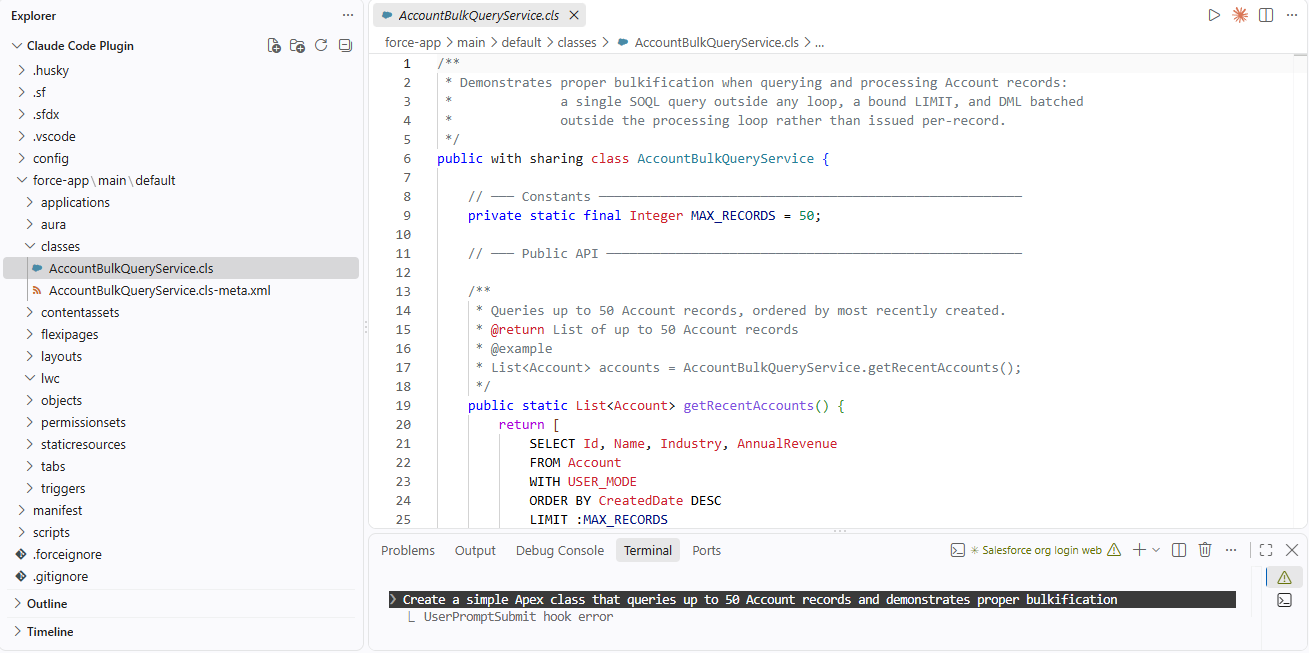
The plugin can deploy metadata to a connected org. That is the whole point, and it is also the risk. Treat agent output as an untrusted pull request:
with sharing / without sharing declarations and user-mode versus system-mode database operations explicitly. Note that in API version 67.0 and later, Apex database operations default to user mode.
Winter ’27 supports latest in place of a version number in REST API URIs. /services/data/latest/<resource> automatically resolves to the most recently released API version. This is documented in the REST API Developer Guide for version 68.0.
Before:
https://<MyDomainName>.my.salesforce.com/services/data/v67.0/sobjects/Account
After:
https://<MyDomainName>.my.salesforce.com/services/data/latest/sobjects/Account
You can enumerate available versions through the Versions resource.
For exploration, scripting, local tooling, and sandbox testing this removes real friction. Every seasonal release currently forces a decision: sweep version numbers across dozens of scripts, or drift onto an increasingly old version.
For production integrations, latest is a liability rather than a convenience. API versioning exists precisely so that Salesforce can change response shapes and default behaviours between versions without breaking existing callers. An endpoint that silently changes version on your upgrade weekend converts a controlled migration into an unannounced one, and the failure mode is quiet: a field that changed serialisation, a default that flipped, a response your parser handles slightly wrong.
The Winter ’27 default behaviour change for Apex database operations is a good illustration of why version pinning matters. In API version 67.0 and later, Apex database operations run in user mode by default, where 66.0 and earlier defaulted to system mode. Version numbers carry semantics, not just recency.
Recommendation: pin explicit versions in production integrations. Use latest in exploratory tooling, sandbox scripts, and CI environments where a break is visible immediately.
Separately from this feature, SOAP, REST, and Bulk API versions 31.0 through 40.0 are scheduled for deprecation in the Summer ’27 release and retirement in Summer ’28, at which point REST returns 410: GONE. Versions 21.0 through 30.0 were already retired in Summer ’25. Winter ’27 also adds compiler warnings for Apex saved at API versions 9.0 through 19.0. If your integration inventory contains anything in these ranges, that is a higher-priority item than adopting latest.
Elastic limits let an org keep enqueuing asynchronous Apex jobs beyond its standard rolling 24-hour limit, up to a higher elastic limit, with throttled processing instead of outright failure. In Winter ’27 the Beta extends this from Queueable Apex and future methods to Batch jobs.
Before Winter ’27, elastic limits applied only to Queueable Apex and future methods in production and demo orgs. Batch Apex and scheduled jobs remained hard-capped at the rolling 24-hour asynchronous job limit, which meant an org in an overage situation saw batch jobs fail outright.
DailyAsyncApexElasticExecutions = DailyAsyncApexExecutions
                                + min(licensed DailyAsyncApexExecutions, 2,000,000)
The licensed rolling 24-hour asynchronous job limit is defined as 250,000 jobs or 200 times the number of applicable user licenses, whichever is greater. The additional capacity beyond your standard rolling 24-hour limit is capped at either your org’s licensed asynchronous Apex job limit or 2 million jobs, whichever is lower.
So an org with a 250,000 rolling limit and a 250,000 licensed limit gets an elastic limit of 500,000 (250,000 + min(250,000, 2,000,000)). An org with a 12 million licensed limit gets an elastic limit of 14 million (12,000,000 + min(12,000,000, 2,000,000)), because the second term is capped at 2 million.
One correction worth flagging if you have read about this feature elsewhere: earlier documentation capped the additional capacity at 10 million jobs. Salesforce revised that figure down as part of the Winter ’27 release notes update published the week of 24 August 2026. The 10 million number is retired.
If an org reaches both the rolling 24-hour limit and the elastic limit, exceptions are thrown for jobs enqueued beyond the elastic limit. Elastic limits raise the ceiling; they do not remove it.
When executions over the rolling 24-hour window exceed the daily limit, Salesforce processes additional enqueued jobs at a throttled rate of one concurrent job per asynchronous Apex type. For Batch specifically, the system throttles the processing rate of in-flight Batch jobs and limits new Batch jobs to one active job at a time. Normal concurrency resumes only once executions in the trailing 24 hours fall back below the daily limit.
Read that carefully before treating this as free capacity. Jobs complete rather than fail, but they complete slowly and serially. A nightly window that assumed four concurrent batch jobs will not fit into the same window under throttling. If you have SLAs expressed in wall-clock time, throttled success can be operationally indistinguishable from failure.
Enable in Setup → Apex Settings → Use elastic limits for asynchronous Apex jobs (Beta).
The Apex Jobs page in Setup shows a banner with jobs processed in the trailing 24 hours against both limits, plus whether processing is currently throttled. Programmatically:
Map<String, System.OrgLimit> limitsMap = OrgLimits.getMap();
System.OrgLimit dailyLimit   = limitsMap.get('DailyAsyncApexExecutions');
System.OrgLimit elasticLimit = limitsMap.get('DailyAsyncApexElasticExecutions');

System.debug('Enqueued (24h): '  + dailyLimit.getValue());
System.debug('Daily ceiling: '   + dailyLimit.getLimit());
System.debug('Elastic ceiling: ' + elasticLimit.getLimit());
Two gotchas: if the setting is not enabled, OrgLimits.getMap() does not return a DailyAsyncApexElasticExecutions key at all, so null-check before dereferencing. And getValue() returns jobs enqueued in the last 24 hours, not executed. Throttling triggers on executions, so an alert built naively on getValue() fires early.
To rehearse throttling without a production-scale workload, Winter ’27 adds asyncApexExecutionsOverride to the ApexSettings metadata type (API version 68.0 and later, non-production orgs only). It sets an override below the licensed rolling 24-hour limit, which is the intended way to test elastic behaviour without generating hundreds of thousands of jobs.
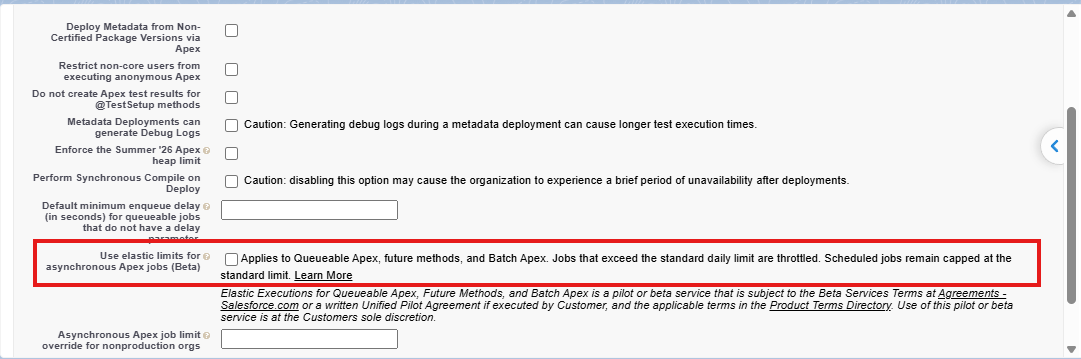
Elastic limits are a resilience mechanism for orgs that occasionally spike past their asynchronous ceiling, not a capacity plan. If your org routinely exceeds its rolling 24-hour limit, reduce job volume (batch more work per Queueable, consolidate triggers that each enqueue their own job, use Platform Events for fan-out) rather than running permanently throttled. The Beta caveat applies: Salesforce guarantees no GA timeframe.
Apex integration tests can now make real HTTP callouts to any authorised endpoint, including External Services configured through Named Credentials, without an HttpCalloutMock. In Summer ’26 (API version 67.0), integration tests existed but callouts were limited to Agentforce and Data 360 services; everything else still required a mock. Winter ’27 removes that restriction and adds a @BeforeClass annotation for test data shared across methods in a class.
This remains a Developer Preview feature, available only in scratch orgs. It is not available in production orgs, sandboxes, or during metadata deployments, and Salesforce reserves the right to change or deprecate it without notice.
Mock-based tests verify that your code handles a response you wrote yourself. That is useful for branch coverage and useless for catching the failure that actually happens in production: the vendor changed a field from a string to an object, added a nullable property, started returning 204 instead of 200, or tightened an auth requirement. Mocks drift from reality silently, and the drift is invisible until deployment.
Integration tests trade Apex’s automatic rollback for the ability to hit the real endpoint. That trade is the whole design. Because data commits, you own the cleanup.
Enable the feature in your scratch org definition file:
{
  "orgName": "Company",
  "edition": "Developer",
  "features": ["ApexIntegrationTests"]
}
Then write the class with @IntegrationTest on the class and its test methods:
@IntegrationTest
public with sharing class OrderApiIntegrationTest {

    @BeforeClass
    static void setup() {
        Account a = new Account(Name = 'Integration Test Account');
        insert as user a;
        // Platform auto-commits data set up in @BeforeClass.
        // No explicit commit call is needed here.
    }

    @IntegrationTest
    public static void testRealEndpointReturnsExpectedShape() {
        Account a = [SELECT Id FROM Account
            WHERE Name = 'Integration Test Account'
            WITH USER_MODE];

        Http h = new Http();
        HttpRequest req = new HttpRequest();
        req.setEndpoint('callout:Order_Service/v1/orders');
        req.setMethod('GET');
        HttpResponse res = h.send(req);

        Assert.areEqual(200, res.getStatusCode());
        Map<String, Object> body =
            (Map<String, Object>) JSON.deserializeUntyped(res.getBody());
        Assert.isTrue(body.containsKey('orders'), 'Contract changed: orders key missing');
    }

    @TearDown
    public static void tearDown() {
        delete as user [SELECT Id FROM Account WHERE Name = 'Integration Test Account'];
    }
}
Data set up inside @BeforeClass commits automatically. You do not need to call a manual commit method there. Use @TearDown to clean up committed data after the test class finishes.
Three pieces of machinery matter:
@BeforeClass (new in Winter ’27) sets up data shared across methods in the class, and the platform commits that data for you. This matters more now that setup is no longer rolled back for free.IntegrationTest.commitTestOnly() is for committing data created inside a test method itself, mid-transaction, so it is visible to other threads and services. It also resets the uncommitted-work checkpoint so subsequent callouts do not fail. It can only be called from an @IntegrationTest method, and it is unnecessary for data created in @BeforeClass.@TearDown marks a static cleanup method that runs after the test regardless of pass, fail, or exception. The teardown transaction auto-commits. Delete child records before parents to avoid foreign key errors.| Comparison | Unit Tests (@IsTest) | Integration Tests (@IntegrationTest) |
|---|---|---|
| Transaction behaviour | Auto-rollback | Data commits; use @TearDown |
| Data visibility | Test data silo by default | SeeAllData=true by default |
| Code coverage | Counts toward deployment requirements | Does not count |
| Metadata deployments | Included in RunAllTests | Excluded |
| Execution | Sync or async | Async only, 1 concurrent execution per org |
| Maximum runtime | Standard limits | 10 minutes |
Additional restrictions: no @TestVisible access from @IntegrationTest classes, you cannot mix @IntegrationTest and @IsTest on the same class, integration tests cannot be called from @IsTest methods, asynchronous Apex governor limits apply, and integration tests share the 24-hour asynchronous test run limit with unit tests and flow tests.
Do not migrate your existing test suite. Integration tests do not count toward the 75% code coverage requirement, so they complement unit tests rather than replacing them. Keep isolated business logic, trigger behaviour, and branch coverage in @IsTest classes. Reserve integration tests for contract verification against real services, behaviour that depends on committed data (field history tracking is the canonical example, since rollback means history records are never created in unit tests), and end-to-end paths worth the runtime cost.
The one-concurrent-test-per-org limit is an architectural constraint on your CI design. A suite of twenty integration tests runs serially in one scratch org. Prefer short focused tests over monolithic ones, create your own setup data rather than reusing org data to avoid row lock contention, and budget against the 10-minute ceiling.
The Apex Symbol API is a Tooling API REST resource that returns compiler-grade metadata for built-in, custom, packaged, and dynamic Apex types, including classes, interfaces, enums, methods, and triggers. It is Beta, available in API version 68.0 and later, and requires the Author Apex org permission plus the View Setup user permission.
GET /services/data/v68.0/tooling/symbols/?category=builtin&namespace=System&name=ApexPages
Query parameters:
| Parameter | Required | Values |
|---|---|---|
category | Yes |
builtin (standard types such as System, Database, Messaging),
database (custom and packaged types),
dynamic |
namespace | No |
Filters to a namespace. Pass an empty string
(namespace=) for the local org namespace only |
name | No |
Filters to a specific type name. Combines with
namespace |
The response returns a typeStubs array. Each stub carries name, namespacePrefix, kind (CLASS, INTERFACE, ENUM, TRIGGER), modifiers, annotations, superClass, interfaces, fields, properties, methods, innerTypes, triggerOperations, triggerObjectType, documentation, and compileError.
Before Winter ’27, tool builders assembled Apex type information from the Tooling API completions resource and the SymbolTable object, usually with an Apex grammar parser bolted on to fill the gaps. The result was incomplete, and it drifted every time the language changed.
The structural improvement worth noticing is type references. Types are returned as nested objects with namespacePrefix, name, and typeParameters rather than as strings, so List<Account> arrives already decomposed instead of as internal encoding a client has to parse. Inherited members carry a definingType reference, so a tool can tell where a method was actually declared.
Salesforce documents these: code completion with full generic type support, displaying official documentation for built-in types, displaying ApexDoc for custom types, showing constructor signatures with parameter types and modifiers, identifying trigger operations such as before insert without parsing source, and grounding AI agents that generate Apex.
That last one is the reason this API and the Claude Code plugin from section 4 belong in the same release. An agent that queries compiler-verified type information does not need to guess whether Messaging.SingleEmailMessage.setTargetObjectId() exists or what it accepts. If you are building internal AI tooling against your org, this closes the grounding gap that produces plausible-looking code referencing methods that were never there.
Winter ’27 adds the apexCompileResults Tooling API resource, which returns compilation results for only those Apex classes and triggers with validation errors, instead of forcing a full-org recompile to find out what is broken. It is generally available in API version 68.0 and later and requires the Author Apex org permission.
POST /services/data/v68.0/tooling/apexCompileResults/
The request body must be an empty JSON object ({}). Specifying any fields returns an error. The request is synchronous.
Invalid Apex accumulates invisibly. A field gets renamed, a managed package upgrades, an API version is retired, and a class that nobody has opened in two years quietly flips to IsValid = false. You typically discover it at the worst moment, during a deployment, because compile-on-deploy recompiles the whole org and surfaces every latent error at once in a release window.
Historically the diagnostic tool was the blunt one: recompile all classes and read the wreckage.
{
  "status": "PARTIAL_FAILURE",
  "results": [
    {
      "name": "MyInvalidClass",
      "namespace": "MyNamespace",
      "success": false,
      "problems": [
        { "line": 14, "column": 9, "message": "Variable does not exist: var1" }
      ],
      "warnings": [
        { "line": 0, "column": 0,
          "message": "Apex API version 18.0 is scheduled for retirement. Update to the latest API version to avoid compile failures." }
      ]
    }
  ]
}
status is either OK (all invalid classes compiled successfully, or none needed recompilation) or PARTIAL_FAILURE. The results array contains only failures; classes that compile cleanly are omitted, and warnings are returned only for classes that also have errors.
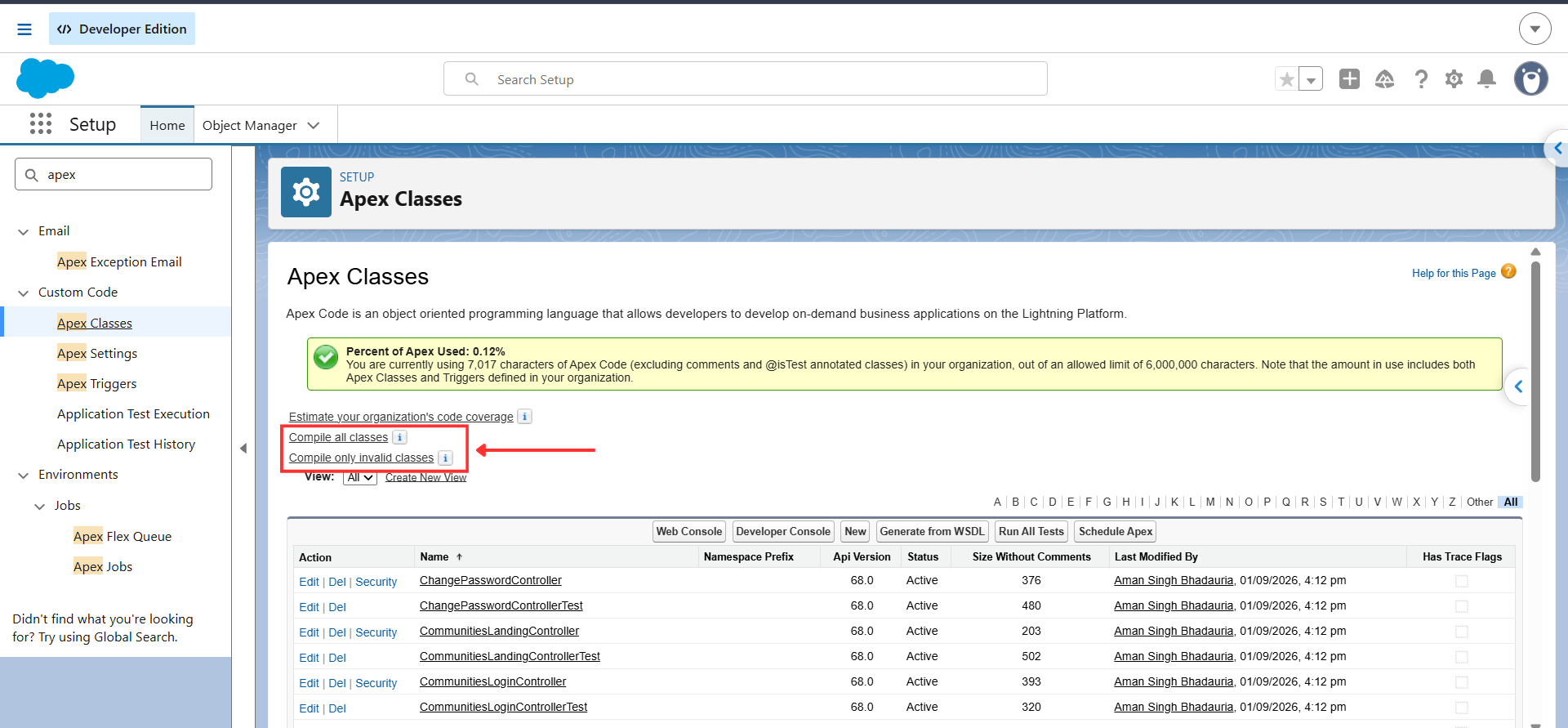
Read this carefully, because it is the least intuitive part of the feature: neither the API nor the Setup buttons update the IsValid field, even on success. Salesforce’s release notes state it plainly. Successful compilation through the Compile only invalid classes and Compile only invalid triggers buttons, or through the /apexCompileResults endpoint, does not update the corresponding isValid field on the affected Apex classes or triggers. The value stays false.
This makes the feature purely diagnostic. It tells you what is broken and why, but it does not flip a status flag anywhere, in the API or in Setup. If your monitoring or CI pipeline was planning to check IsValid after calling this endpoint to confirm a fix landed, that check will never pass. Treat a clean apexCompileResults response (status: "OK" with an empty results array) as your source of truth that compilation succeeded, not the IsValid field on the class or trigger record.
The useful pattern is monitoring, not remediation. Run it on a schedule from CI, or as a pre-deployment gate, and treat a PARTIAL_FAILURE as a signal to fix before the release window rather than during it.
It also pairs directly with a Winter ’27 change that will generate noise for older orgs: compiler warnings now appear for Apex saved at API versions 9.0 through 19.0. Those warnings surface through this resource, which makes it a practical way to inventory legacy Apex ahead of retirement deadlines. Note the earlier caveat, though: warnings are returned only for classes that also have compilation errors, so this is not a complete warning inventory on its own.
login() now requires the Use Any API Auth user permission. This is a live requirement, not a scheduled retirement. Audit integration users before your upgrade weekend.testLevel query parameter.Apex development. Heap is the only Winter ’27 item that alters production behaviour with no opt-in. Because no other governor limit moved, the practical effect is that heap stops being the first constraint you hit and CPU time frequently becomes the new one.
LWC development. Template expressions shift the boundary between markup and class. Used well they delete a category of single-use getter; used badly they move untestable logic into HTML. Adopt per component and agree a team convention for how much expression complexity belongs in a template.
SOQL and query design. FORMULA() points toward filtering at the query layer rather than fetching wide and discarding. Beta status and the two-operator restriction make it a direction to prototype, not a pattern to standardise on this release.
Async processing. Elastic limits change the Batch failure mode from exception to degraded throughput. That is better, but it moves the monitoring problem: you now detect throttling rather than failures, and your scheduling assumptions must survive serialised execution.
API and integration maintenance. latest is useful in tooling and dangerous in production. The real integration work this cycle is auditing SOAP login() permissions and inventorying anything on API 31.0 through 40.0.
Testing. Winter ’27 splits Apex testing into two tiers. Unit tests keep coverage and deployment gating; integration tests get real callouts, committed data, and the cost of owning your own teardown. Deciding which tier each test belongs in is a new design question your team did not have last release.
AI-assisted development. The Claude Code plugin, the LSP-backed MCP server, and the Apex Symbol API together shift AI from guessing at your org to querying it. The review discipline does not change.
Deployment. Release readiness is now more org-state dependent: which heap ceiling each org enforces, which Beta settings are on, which component API versions are set. apexCompileResults gives you a way to check one of those states before the release window rather than during it.
Limits.getLimitHeapSize() in production and in every sandbox and scratch org you deploy from. Reconcile any differences.6000000, 12000000) and replace them with Limits.getLimitHeapSize().Use Any API Auth permission before your upgrade weekend.asyncApexExecutionsOverride in a sandbox to rehearse throttled behaviour and confirm your batch windows still hold./services/data/latest/.POST /tooling/apexCompileResults/ against production and each sandbox to inventory invalid Apex before a release window, not during one.@IntegrationTest class has a @TearDown that deletes child records before parents, and confirm your CI accounts for one concurrent test per org.@IsTest classes. Integration tests do not count toward the 75% deployment requirement.| Feature | Status | Where it works |
|---|---|---|
| Increased Apex heap limits (10 MB / 25 MB) | GA, automatic | All orgs on upgrade |
REST API /services/data/latest/ | GA | All orgs supporting REST API |
apexCompileResults (recompile only invalid Apex) | GA | Tooling API 68.0+, Author Apex permission |
FORMULA() in SOQL WHERE | Beta | Sandbox, Developer Edition, scratch orgs on API 68.0+. Not production |
| Elastic limits for Batch Apex | Beta | Opt-in via Apex Settings |
| Apex Symbol API | Beta | Tooling API 68.0+, Author Apex and View Setup permissions |
| Real HTTP callouts in Apex integration tests | Developer Preview | Scratch orgs only. Not production, sandboxes, or deployments |
| Complex template expressions in LWC | Status changed in Winter '27; verify in your org's docs |
Per component, apiVersion 66.0+ |
| Salesforce development plugin for Claude Code | Available (external tooling, open source) | Local dev environment |
Developer Preview carries a stricter caveat than Beta. Salesforce states that all commands, parameters, and features in a developer preview are subject to change or deprecation at any time, with or without notice, and should not be implemented in a production package.
Salesforce’s standard disclaimer applies to every Beta item: features noted as beta, pilot, or developer preview carry no guarantee of reaching general availability in any particular timeframe, or at all. Base purchasing and architectural commitments only on generally available functionality.
| Feature | Developer Impact | Status | Best Use Case | Key Consideration |
|---|---|---|---|---|
| Higher Apex heap limits | Removes heap as the binding constraint on data-heavy transactions; lets you revert scope-size workarounds | GA, automatic | Batch jobs and integrations deserialising large JSON or building large in-memory maps | Sandbox and production enforce different ceilings until both upgrade; CPU time did not move |
FORMULA() in SOQL | Moves computed filters from Apex loops into the query; eliminates query-only formula fields | Beta, API 68.0+, non-production only | ISV packages that cannot modify subscriber schema; simple additive or date-difference filters |
WHERE only; + and - only;
no production availability |
| Complex template expressions (LWC) |
Deletes single-use getters; enables per-item formatting inside
for:each without pre-mapping data | Verify status for your org | Display formatting and simple conditional rendering in iterations |
Logic in templates is invisible to JS unit tests;
< breaks HTML parsing in text nodes |
| Claude Code plugin | Gives the coding agent real project, org, and Apex language-server context instead of generic knowledge | Available, open source | Scaffolding, test generation, metadata deployment in scratch orgs | Can deploy to a connected org; authenticate to sandbox only and review all output |
REST API latest | Removes per-release URI maintenance in scripts and tooling | GA | Exploration, sandbox scripts, CI |
Never pin production integrations to latest;
version numbers carry behavioural semantics |
| Elastic limits for Batch | Converts async overage from hard failure to throttled processing | Beta, opt-in | Orgs with occasional spikes past the rolling 24-hour async limit | Throttling drops Batch to one active job; monitor executions, not enqueues |
| Real HTTP callouts in integration tests | Catches contract drift that mocks structurally cannot catch | Developer Preview, scratch orgs only | Verifying real vendor API responses and behaviour that depends on committed data | No auto-rollback, no code coverage credit, 1 concurrent test per org, 10-minute cap |
| Apex Symbol API | Gives tools and AI agents compiler-verified type metadata instead of parsed guesses | Beta, API 68.0+ | Building IDE completion, documentation tooling, or grounding internal AI dev tools | One request per org at a time; packaged ApexDoc not returned in 68.0 |
| Recompile only invalid Apex | Turns "recompile the org and see what breaks" into a targeted, scriptable check | GA, API 68.0+ | Pre-deployment gates and scheduled monitoring for latent invalid Apex |
Reports only. Nothing updates IsValid, not the API
and not the Setup buttons |
Synchronous Apex heap increases from 6 MB to 10 MB and asynchronous Apex heap increases from 12 MB to 25 MB. The change is generally available and applies automatically when your org upgrades to Winter '27, with no setting to enable.
Winter '27 is API version 68.0. Features gated on
FORMULA() in SOQL and the
asyncApexExecutionsOverride field in
ApexSettings require API version 68.0 or later.
No. In Winter '27, FORMULA() is a Beta feature available
only in sandboxes, Developer Edition orgs, and scratch orgs on API
version 68.0 or later. It is not available in production and is
governed by Salesforce's Beta Services Terms.
Addition and subtraction only. Expressions can evaluate to
DOUBLE, INTEGER, DATETIME,
DATE, and CURRENCY, with
INTEGER behaving like DOUBLE and
DATE behaving like DATETIME. It is
supported in the WHERE clause but not in
HAVING.
Enable the Enforce the Summer '26 Apex heap limit checkbox in Setup under Apex Settings. It is available in non-production orgs and keeps the org on the 6 MB and 12 MB ceilings so code built there is safe to deploy into an org that has not yet upgraded.
Set the component's apiVersion to 66.0 or later in its
.js-meta.xml file. Enablement is per component rather
than org-wide. Confirm the feature's current availability status in
your org's release documentation before using it in production code.
When enabled, an org can enqueue asynchronous jobs beyond its rolling 24-hour limit up to an elastic limit calculated as the daily limit plus the lesser of the licensed daily limit or 2 million. Once executions exceed the daily limit, in-flight Batch jobs are throttled and new Batch jobs are restricted to one active job at a time. Jobs beyond the elastic limit still throw exceptions.
It packages roughly 40 Salesforce development skills, specialised agents, three MCP servers, hooks, and commands into a single install for Claude Code. It requires Claude Code, Node.js LTS, Salesforce CLI, and Python 3.8 or above.
It works, but you should not. Pinning an explicit version is what
prevents a Salesforce release from silently changing response
behaviour under a running integration. Use latest for
exploration, sandbox scripts, and CI environments.
In API version 67.0 and later, Apex database operations run in user mode by default, enforcing the current user's permissions and field-level security. API version 66.0 and earlier default to system mode.
Yes, in Apex integration tests, and only as a Developer Preview in scratch orgs. Winter '27 expands integration test callouts from Agentforce and Data 360 to any authorised endpoint, including External Services via Named Credentials. Integration tests are not available in production orgs, sandboxes, or metadata deployments, and they do not count toward code coverage.
No. Integration tests are excluded from RunAllTests
during metadata deployments and do not count toward the 75% code
coverage requirement, so unit tests remain mandatory. Use integration
tests for real service contracts and behaviour that depends on
committed data, such as field history tracking.
It returns compiler-grade metadata for Apex types over the Tooling API, so tools can offer accurate code completion, display ApexDoc and built-in type documentation, show constructor signatures, and ground AI agents that generate Apex. It is Beta, requires API version 68.0 or later plus the Author Apex and View Setup permissions, and enforces one concurrent request per org.
No. It returns compilation results for invalid classes and triggers,
and it does not update the IsValid field. Neither do
the "Compile only invalid classes" and "Compile only invalid
triggers" buttons in Setup. Treat a clean
apexCompileResults response as your confirmation that
compilation succeeded, not the field.
Two items are genuinely time-sensitive: audit integration users for
the Use Any API Auth permission, because SOAP
login() now requires it, and reconcile heap ceilings
between sandbox and production so nothing is deployed against a
limit production does not yet enforce.
No, in the contractual sense. Salesforce states that beta, pilot, and developer preview features are not guaranteed to reach general availability in any particular timeframe, or at all. Prototype with them and keep a production-viable alternative in place.

Cloudespacio is a trusted Salesforce implementation partner headquartered in India, helping businesses transform sales, service, manufacturing, automotive, and customer operations with Salesforce.
Copyright © 2026 Cloudespacio Software Pvt. Ltd. All Rights Reserved.
