
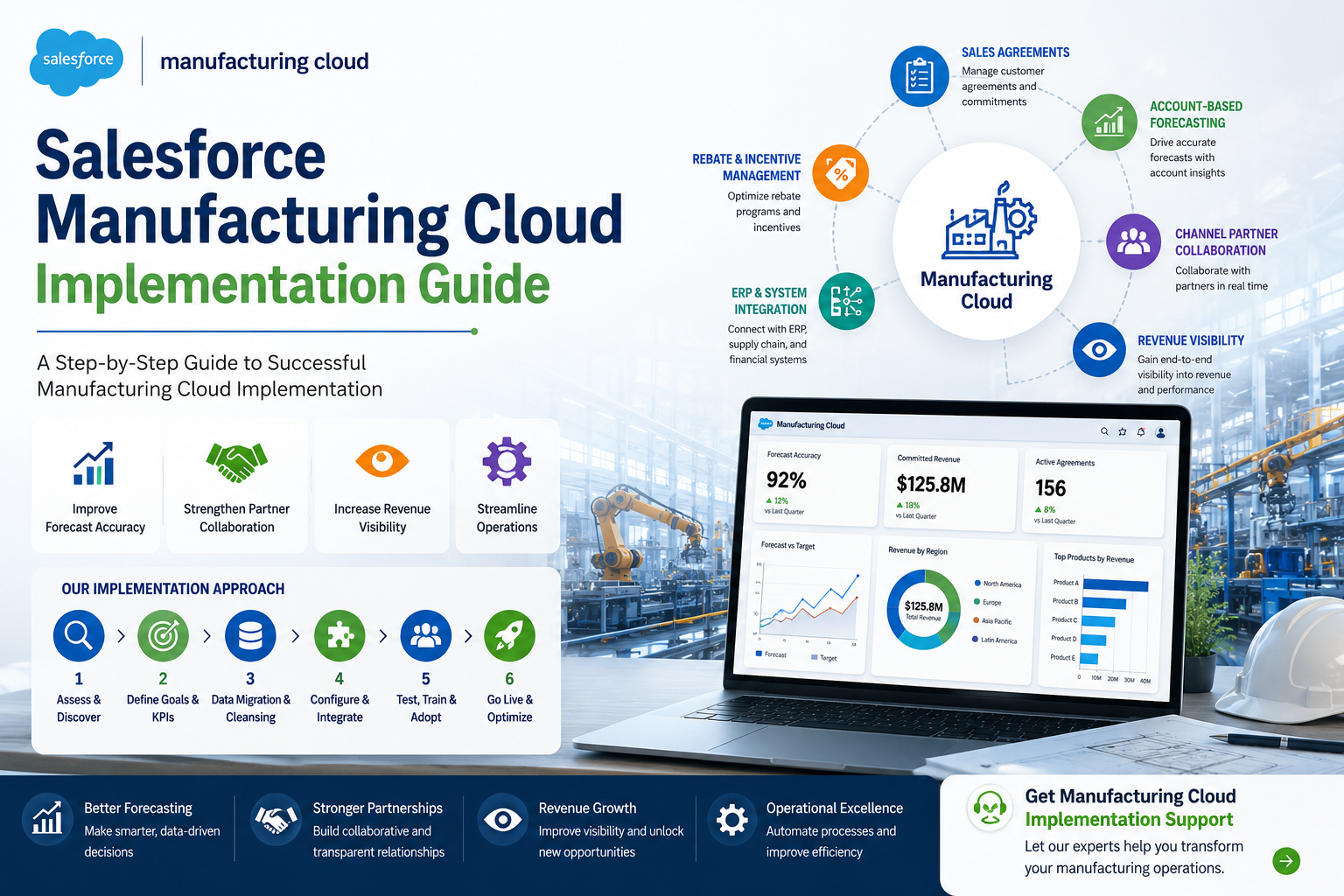
Manufacturing companies today face increasing pressure to improve forecasting accuracy, strengthen customer relationships, manage complex partner networks, and gain complete visibility into revenue streams. Traditional systems often operate in silos, making it difficult for sales, operations, and finance teams to work together efficiently.
Salesforce Manufacturing Cloud was designed to address these challenges by providing a unified platform that connects customer data, sales agreements, account-based forecasting, channel partnerships, and revenue management processes.
However, achieving the full value of Manufacturing Cloud requires a well-planned implementation strategy. From defining business objectives to integrating ERP systems and training users, every step plays a critical role in long-term success.
In this guide, we’ll walk through the complete Salesforce Manufacturing Cloud implementation process, key benefits, best practices, common challenges, and strategies to maximize ROI.
Salesforce Manufacturing Cloud is an industry-specific CRM solution built on the Salesforce platform that helps manufacturers improve collaboration across sales, operations, channel partners, and customers.
The platform enables organizations to:
Unlike traditional CRM systems, Manufacturing Cloud is specifically designed to meet the unique needs of manufacturers by combining customer relationship management with operational planning and forecasting.
Modern manufacturing organizations require more than customer management tools. They need real-time visibility into demand, revenue, and partner performance.
Key reasons manufacturers are implementing Salesforce Manufacturing Cloud include:
Improved Forecast Accuracy: Account-based forecasting helps sales teams generate more reliable forecasts based on customer agreements and actual purchasing behavior.
Better Customer Relationships: Sales teams gain a complete view of customer interactions, contracts, opportunities, and historical purchasing data.
Enhanced Partner Collaboration: Manufacturers can collaborate more effectively with distributors, dealers, and channel partners through shared forecasting and demand planning.
Revenue Visibility: Rebate management, incentive programs, and sales agreements provide greater transparency into future revenue streams.
Connected Business Operations: Integration with ERP, supply chain, and financial systems enables seamless data sharing across departments.
Traditional forecasting methods often rely on assumptions and manual spreadsheets.
Manufacturing Cloud enables organizations to create forecasts based on actual customer commitments, improving forecast accuracy and business planning.
Sales agreements help manufacturers track committed volumes, pricing structures, and contract performance.This allows organizations to monitor fulfillment progress and identify revenue opportunities.
Manufacturers often depend on distributors and dealers to reach customers.Manufacturing Cloud provides visibility into partner forecasts, performance metrics, and sales activities.
Organizations can manage rebates, incentives, promotions, and revenue programs from a centralized platform.This helps improve profitability while maintaining transparency across the sales cycle.
By leveraging Salesforce AI capabilities, manufacturers can identify trends, forecast demand, and make data-driven business decisions.
A successful implementation follows a structured approach. Below is a proven framework that organizations can use to deploy Manufacturing Cloud effectively.
The first phase focuses on understanding current processes, challenges, and goals.
Key questions include:
During this stage, stakeholders from sales, operations, finance, IT, and leadership should be involved.
Deliverables
Implementation success should be measured through clearly defined objectives.
Common Manufacturing Cloud KPIs include:
Establishing measurable goals helps track ROI after deployment.
Once requirements are gathered, organizations can begin designing their Manufacturing Cloud environment.
This includes:
Data Model Design
Configure:
Security and Permissions
Define user roles and access levels for:
Reporting Framework
Identify dashboards and reports needed for leadership and operational teams
Data quality directly impacts implementation success.
Before migration, organizations should:
Common Data Sources
A clean dataset improves reporting accuracy and user adoption.
Manufacturing Cloud delivers maximum value when connected with existing enterprise systems.
Common integrations include:
ERP Systems
Supply Chain Systems
Financial Systems
Integration eliminates data silos and ensures consistency across the organization.
At this stage, the platform is configured based on business requirements.
Sales Agreements Configure customer agreements, committed quantities, pricing structures, and performance tracking.
Account-Based Forecasting Set up forecasting models aligned with customer purchasing behavior.
Channel Collaboration Enable forecasting and planning collaboration with distributors and dealers.
Rebate and Incentive Management Configure programs that support revenue growth and channel engagement.
Dashboards and Reports Create executive dashboards that provide visibility into:
Comprehensive testing helps identify issues before go-live.
Testing should include:
Functional Testing Verify all business processes operate correctly.
Integration Testing Validate data flows between Manufacturing Cloud and external systems.
User Acceptance Testing (UAT) Allow business users to validate real-world scenarios.
Performance Testing Ensure the platform performs efficiently under expected workloads.
Technology adoption is often the biggest challenge in CRM implementations.
Organizations should provide:
Change management initiatives should clearly communicate benefits and encourage user engagement.
After successful testing and training, the solution can be deployed.
Go-live activities include:
A dedicated support team should be available during the initial launch period.
Implementation is not the end of the journey.
Organizations should continuously monitor:
Regular optimization ensures the platform continues delivering business value.
Common Manufacturing Cloud Implementation Challenges
Despite its benefits, organizations may encounter implementation challenges.
Get Manufacturing Cloud Implementation Support
Implementing Salesforce Manufacturing Cloud requires the right strategy, technical expertise, and industry knowledge.
Whether you’re planning a new deployment, migrating from legacy systems, or optimizing an existing Salesforce environment, expert guidance can help reduce risk and accelerate business outcomes.
Contact our Salesforce specialists today to discuss your Manufacturing Cloud implementation goals and discover how a tailored solution can improve forecasting, revenue visibility, and operational efficiency.
Salesforce Manufacturing Cloud is an industry-specific CRM solution that helps manufacturers manage forecasting, sales agreements, partner collaboration, and revenue visibility on a single platform.
Implementation timelines vary depending on project complexity, integrations, and business requirements. Most projects range from several weeks to a few months.
Yes. Manufacturing Cloud can integrate with ERP platforms such as SAP, Oracle ERP, Microsoft Dynamics, and NetSuite.
Key benefits include improved forecasting, better customer visibility, enhanced partner collaboration, revenue transparency, and AI-powered business insights.

Cloudespacio is a trusted Salesforce implementation partner headquartered in India, helping businesses transform sales, service, manufacturing, automotive, and customer operations with Salesforce.
Copyright © 2026 Cloudespacio Software Pvt. Ltd. All Rights Reserved.
